Up to 10 source files can be selected for import at one time. Supported file types include: .xls, .xlsx, .csv, .dat, and .xpt.
From the Phoenix menu, select PK Submit > Data Preparation Wizard.
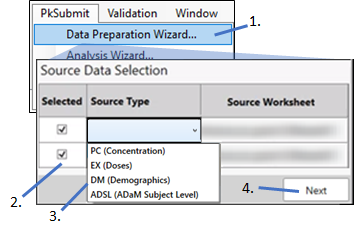
From the list of datasets currently loaded in Phoenix, check the boxes for those to work with in PK Submit.
Click in the Source Type cell and select the source of the dataset from the menu. Choose from PC (Concentration), EX (Doses), DM (Demographics), or ADSL (ADaM Subject Level).
Click Next to set up the merge (see “Configure the merge”).