R scripts for graphs and file processing
Pirana includes functionality to run custom R-scripts on output from model executions. Scripts can be written by the user, but a considerable collection of scripts is also bundled with Pirana, which can serve as starting point for your own implementations.
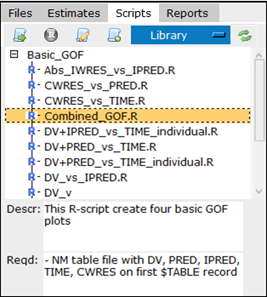
The Scripts tab on the right side of the Pirana window is where you can find a list of available R scripts.
 p
p
Scripts are stored in three locations:
– Library: Group-wide scripts are stored in the scripts folder in the location where Pirana is installed.
– My scripts: User scripts are stored in .pirana\scripts in your home directory.
– Project: Project-specific scripts are stored in the subfolder pirana_scripts in the current folder. This subfolder is not created by default, it must be created by the user.
Use the pull-down in the tab’s toolbar to select the location to list.
The folder structure underlying these scripts folders is reconstructed within the Scripts tab. A new folder can be added to the list by right-clicking in the Scripts tab and selecting the New folder menu option. Right-click on a selected folder to add a new subfolder.
Click  in the Scripts tab toolbar to reload the script list.