Define ratio calculations
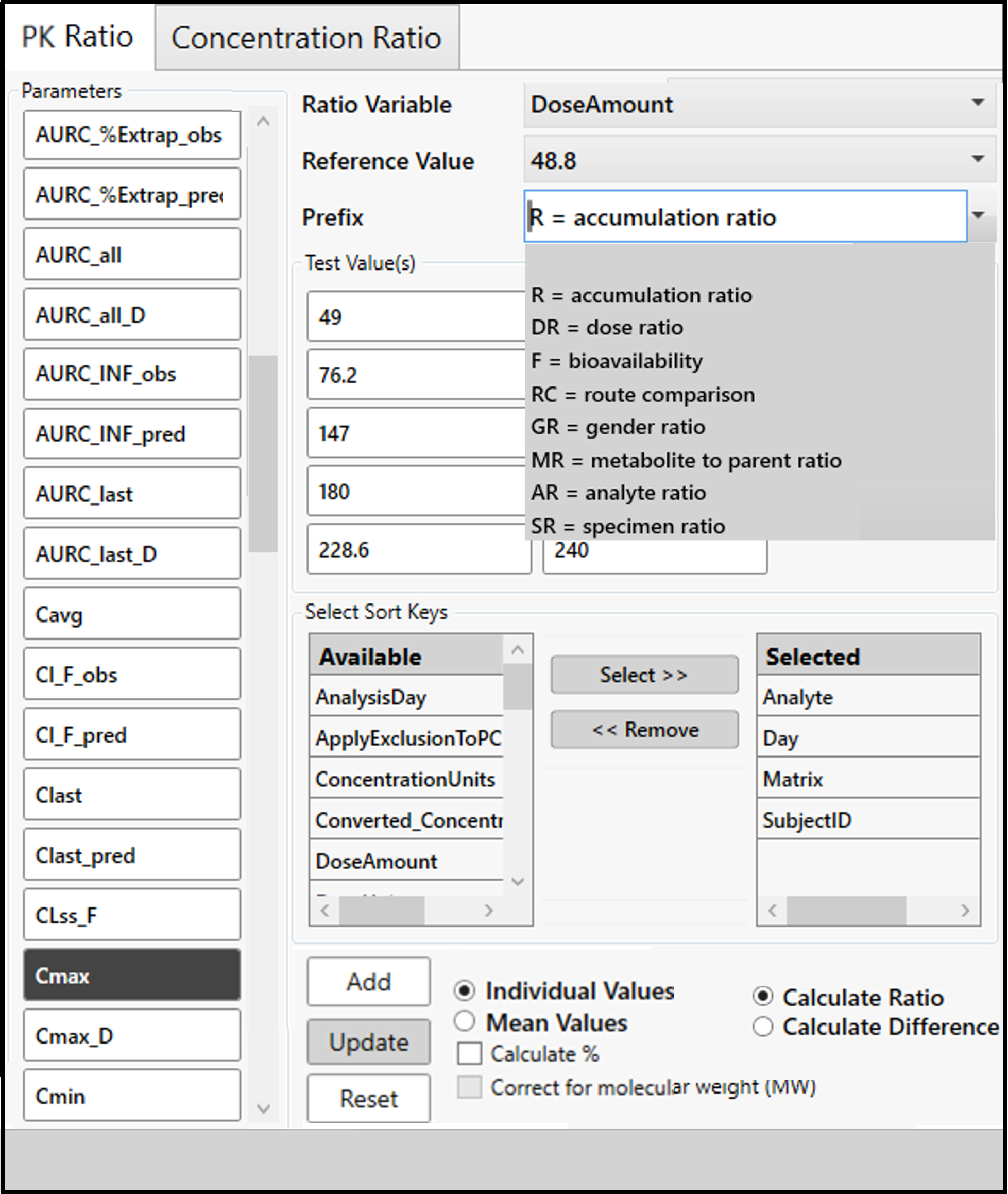
The PK Ratios and Concentration Ratio tabs are very similar.
Select the PK parameters for the calculations by clicking one or more buttons on the left.
Select the Ratio Variable and from the dropdown menu.
Choose the value of the variable to use as a reference from the Reference Value dropdown.
Enter a prefix or select one from the Prefix dropdown menu. The prefix is added to the parameter name to identify the ratio once it is created.
The remaining values of the ratio value are displayed as Test Value(s). Click one or more to use them in the ratio calculation.
For the sort keys, use the buttons between the two lists to move the key(s) and create a Selected list on the right.
Some ratios may require different sort keys. For example, if mean values are desired, remove Subject from the list of Selected sort keys. (Changing sort keys here does not affect NCA sort keys.)
For the Concentration Ratios tab, include NominalTime as a sort key if you want individual concentrations.
Choose if ratios should be reported on each subject (Individual Values) or if a mean should be reported (Mean Values).
Ratios based on individual selection can be added to the list of selected parameters (ratios based on mean cannot).
Note: The selected sort keys should define unique test and reference parameter values; otherwise only the first test and first reference values will be used.
Mean ratios are important for ratios where a given subject is not found in both groups. For example, if you want a gender ratio, you need to do a ratio based on the mean, not based on individual. The same subject will not be found in both gender groups and no ratio value will be reported.
If Mean Values is selected, use the Minimum Sample Size and Text Replacement fields to apply the small sample size rule to the calculation of summary ratios. Both test and reference sample size must meet the minimum entered in the Minimum Sample Size field for the mean ratio to be calculated, otherwise the Text Replacement value is used.
On the PK Ratios tab, select whether to Calculate Ratio or Calculate Difference.
Check the Calculate % box to show the ratio as a percent rather than as a ratio.
Check the Correct for molecular weight box to normalize the values on molecular weight and then compute the ratio. (This option is not available on the Concentration Ratios tab.)
Press the Add button to add the selections to the table on the right.
If you are editing an existing ratio calculation use the Update button.
If you want to reuse your ratio calculation definitions at a later date, use the Save rule to file and Load rule from file buttons on the right side.
When finished defining ratios, press the OK button.
The ratios are added to the Selected PK Parameters list.
Default settings of options are configurable, see “Ratio Setting” in configuration section.