The Model Textual UI is a Shiny app in which the model code can be edited directly. In addition, tools for adjusting the column mapping and input options are provided.
You can enter this application by right-clicking a model in Pirana and selecting RsNLME shiny > Edit Metamodel.
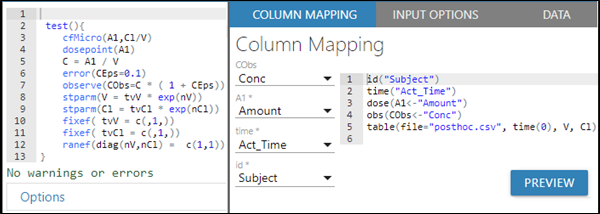
Directly edit the PML statements in the area on the left. As you type a PML statement, it will auto-complete and the code will be checked for each change to the model to ensure that the model is correctly defined. Any warnings or errors found are immediately reported below the code display.

As you enter new model variable statements to the PML, the COLUMN MAPPING tab is updated to list the new variable. Select an input column from the pulldown to map it to the new variable. Click PREVIEW to check the updated mapping code. Refer to the Model Builder’s section on “Model variable descriptions” for more information.
Use the INPUT OPTIONS tab to add MDV, Reset, Steady State, ADDL, and Infusion data for dosing compartments. See the Model Builder’s section on “Setting Model Input Options”.
The DATA tab is available as a reference for viewing the input source data. Use the Show pulldown to control the number of rows visible at one time. Type in the Search field to filter the list. Use the navigation buttons below the table to page through the data.
When finished, click EXIT at the top of the window. In the confirmation popup, press SAVE & EXIT to save the model with the current settings.