The Scenarios run mode option is only available for Population models. Scenarios investigation of different combinations of covariate effects on the same structural model. The Scenarios mode is similar to doing a simple run on several models where their base structural model is the same but the covariate effects are different. If sort keys are specified, then the number of models considered is the product of the total number of scenarios and the total number of unique sort keys.
Refer to the Model Builder “Covariates” discussion for details on adding covariate effects.
With Scenarios selected from the Run Mode pulldown, select the OPTIONS tab.
Refer to the “Simple” run mode section for descriptions of the items available on the Scenarios OPTIONS tab.
The TABLES tab provides tools for adding scenarios to the run.
Press the Add Scenario + button to view a table of defined scenarios.
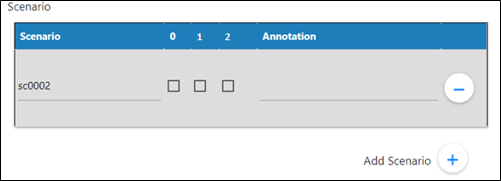
Enter a name in the Scenario column.
Check the box(es) for the covariate effects to consider in the scenario.
The numeric labels for the boxes corresponding to the indices shown in the mmdl. For example:
      fixef( dvdGender1(enable=c(0)) = c(,0,))
      fixef( dvdAge(enable=c(1)) = c(,0,))
      fixef( dCldGender1(enable=c(2)) = c(,0,))
In the Annotation field, type a description of the scenario.
Click + to add another row to the table.
Click — to remove the corresponding scenario definition from the table.