Select PK Submit > Analysis > Finalize PK Data from the main menu.
The required parameters worksheet will typically come directly from an NCA object, but may also be created through the Data Wizard or some other process in Phoenix.
If a Final PK Parameters worksheet already exists, you are asked if you want to continue to use it. Pressing Yes takes you to the PK Parameters Exclusion page. Pressing No displays the Final PK Parameter page, as shown below.
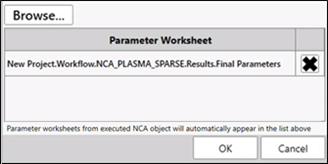
Select the worksheet or use the Browse button to select a worksheet not listed
It must contain the parameters in a stacked format.
Press the OK button.
The Final PK Parameters worksheet is added to the Data folder and you can proceed to select the parameters to exclude.
Note: If the final parameters worksheet is user-created, it is important that it includes all data contained in the NCA Final Parameters worksheet(s). New parameters merged with the NCA parameters must be stored in the “Parameter” column, and their corresponding values stored in the “Estimate” column. All other variables should be populated to match the NCA results.
See also: