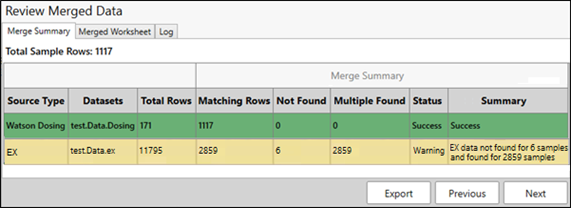
The Merge Summary tab shows a list of data merges that were submitted for processing.
Green indicates that the merge was successful.
For example, sample and dosing worksheets were successfully merged into a single worksheet.
Yellow indicates that there were some issues encountered, however the merge was completed.
For example, there were some missing elements noticed in one file as it was trying to be merged to the other.
Red indicates the merge process was unable to complete. (The Status will show Failed.)
For example, if the merge keys (variables) that were requested in the previous screen do not exist in one of the files.
The following image shows a successfully completed merge resulting in a total of 1117 rows. 1117 rows in the Sample worksheet were matched with data in the Dosing worksheet, all rows were matched (0 Not Found), and there were no multiples (duplicates) identified. The second row shows a merge with EX data that was completed, but there were six samples that did not have EX data available for the merge and 2859 duplicates identified.