Select PK Submit > CDISC > Create CDISC Domains from the main menu.
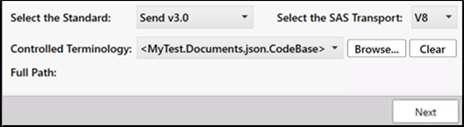
Choose the CDISC standard from the Select the Standard pulldown menu.
The Controlled Terminology field displays the file being used for terminology mapping.
Even though PK Submit comes with all of the Units, Specimen, and PK Parameter codes necessary to specify mappings, CDISC terminology mappings are frequently updated. Using the Browse button, you can locate and upload the latest version of the mappings. (Note that, once a terminology file is uploaded, the Controlled Terminology field changes to a menu for selecting different files. Once a loaded file is selected from the menu, the Full Path to that file is displayed.)
Press the Clear button to return to the default terminology mappings file.
Note: Once a Controlled Terminology file is loaded into PK Submit, a copy of the file is saved locally to:
C:\Users\<user>\Documents\Certara\PKSubmit\CodeLists
Deleting the file from this folder will remove it from the Controlled Terminology menu.
Press the Next button to preview the PC and PP domain data.