Select PK Submit > CDISC > Create Submission Files.
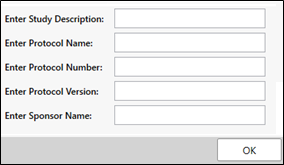
In the dialog, optionally enter a description of the study, a protocol name, number, version, and/or sponsor name to use in the files.
Click OK.
The following files for submission are generated, with all required fields populated.
In the Documents folder:
xlsx folder: Contains the Define.xlsx file.
xml folder: Contains the Define.xml file.
xpt folder: Contains an xpt file for each domain.
When STDM is the standard and AdaM data is imported, the output will also include a Define Adam.xlsx and Define ADaM.xml file.