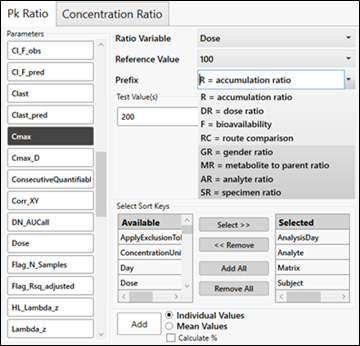
The PK Ratios and Concentration Ratio tabs are very similar.
Select the PK parameters for the calculations by clicking one or more buttons on the left.
Select the variable to serve as the reference from the Reference Variable pulldown menu.
Choose the Reference Variable value from the Reference Value pulldown menu.
Enter a prefix or select one from the Prefix pulldown menu. The prefix is added to the parameter name to identify the ratio once it is created.
Select the Test Value(s) to use in the ratio calculation by clicking one or more of the buttons labeled with the remaining values of the Reference Variable.
If needed, move the sort keys between the two lists by selecting the key(s) and using the Select and Remove buttons, or use the Add All and Remove All buttons to move everything at one time.
Some ratios may require different sort keys. For example, if mean values are desired, remove Subject from the list of Selected sort keys. (Changing sort keys here does not affect NCA sort keys.)
For the Concentration Ratios tab, include NominalTime as a sort key if you want individual concentrations.
Choose if ratios should be reported on each subject (Individual Values) or if a mean should be reported (Mean Values).
Ratios based on individual selection can be added to the list of selected parameters (ratios based on mean cannot).
Mean ratios are important for ratios where a given subject is not found in both groups. For example, if you want a gender ratio, you need to do a ratio based on the mean, not based on individual. The same subject will not be found in both gender groups and no ratio value will be reported.
Check the Calculate % box to show the ratio as a percent rather than as a ratio.
Press the Add button to add the selections to the table on the right.
When finished defining ratios, press the OK button.
The ratios are added to the Selected PK Parameters list.