Sort X values and specify offsets for multiple XY plots
To control sorting of output plots for the XY and X-Categorical XY Plot objects:
Select Graphs > <plot name> in the tree, then click the Content tab.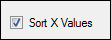
Check the Sort X Values box to sort data in ascending X axis order before creating the plots.
Or
Clear the checkbox to disable automatic sorting.
When creating plots with a hysteresis curve, the Sort X Values checkbox should be cleared.
Shift the first plot
For XY and X-Categorical XY Plot objects, when multiple columns are plotted on a single graph (e.g., predicted and observed results), each plot can be shifted to the left or right. Shifting the first plot requires adjusting the X-axis range. Note that changing the range also affects the other plots, so it is recommended that you position the first plot, if desired, before setting the offsets for the other plots.
Select Axes > X in the tree, then click the Content tab.
Select the Custom option and adjust the values in the Minimum and Maximum fields.
Offset subsequent plots
This option is available for the second and subsequent plots in a multi-plot graph (XY and X-Categorical XY Plot objects).
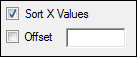
Select the name of the plot to offset under the Graphs menu item.
On the Content tab check the Offset box and enter the number of units (for the XY Plot object) or pixels (for the X-Categorical XY Plot object) that the plot should be shifted.
Entering a positive value moves the plot to the right, a negative value moves it to the left.