Explore slopes of time-concentration graphs
The Slopes selector page allows exploration of the time-concentration graphs in order to identify a set of rules and acceptance criteria for the Lambda Z calculation.
Select PK Submit > PK Analysis > Slope selector from the Phoenix menu.
In the dialog, select the NCA object to use and press the Select button.
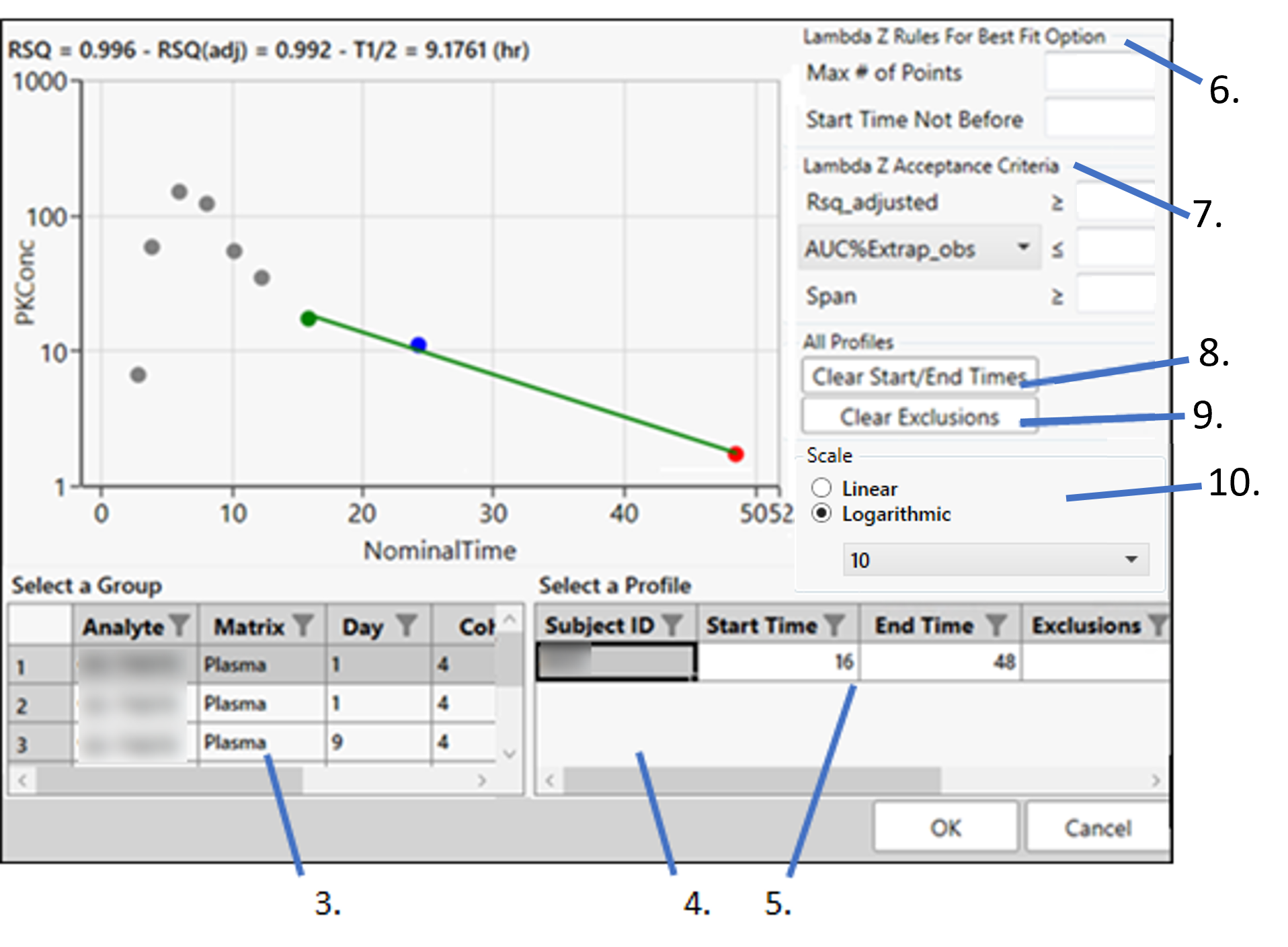
Select a row in the Group table to switch to a set of subjects that are grouped by NCA sort keys combination.
Select a row in the Profile table to view the data points for a different profile.
In the Profile table, enter the values in the Start Time, End Time, and Exclusions columns for each profile.
You can manually select start times and end times by clicking the points on the graph (this action automatically sets the Fit Method in the Profile table to Time Range).
To manually exclude a point, right-click the point in the graph (the point changes to a red X, right-clicking the red X cancels the exclusion).
A start time point is colored green in the graph and an end time point is red. Points that lie between the start and end time points are colored blue.
Define the optional Lambda Z Rules for Best Fit. These rules are used only in the automatic selection of Lambda Z.
In the Max # of Points field, enter the maximum number of points that can be used in the best-fit method for Lambda Z.
If a value is specified, the NCA engine will not consider time ranges that contain more than the specified number of points when finding the best Lambda Z. The entered value must be at least 3.
In the Start Time Not Before field, enter the minimum start time that can be used in the best-fit method for Lambda Z.
If a value is specified, the NCA engine will not consider time ranges that start before this minimum start time when finding the best Lambda Z.
Define the optional Lambda Z Acceptance Criteria. They apply to both the Best Fit method and the Time Range method and are used to flag profiles where the Lambda Z final parameter does not meet the specified acceptance criteria.
Specify the minimum value of Rsq_adjusted that indicates an acceptable fit for Lambda Z in the Rsq_adjusted field. The value must be between 0 and 1.
Use the pull-down menu to select whether to use AUC_%Extrap_obs or AUC_%Extrap_pred (or, for Urine models, AURC_%Extrap_obs or AURC_%Extrap_pred) when indicating the acceptable fit for Lambda Z. In the field, enter the maximum value to use. The value must be between 0 and 100
In the Span field, specify the minimum span or number of half-lives needed for the Lambda Z range to be acceptable. The values must be positive.
Press Clear Start/End Times to have previously selected start time and end time points removed from the graphs and the table.
Press Clear Exclusions to include previously excluded time points in the graphs and table.
Select whether to perform Linear or Logarithmic scaling of the axis and the base (if Logarithmic is specified). Options include: 2, 10, E (base of the natural logarithm).
When OK is clicked, the Start Time, End Time, Exclusions and Fit Method data in the Profile table is transferred to the Slopes panel in the NCA object and the Lambda Z settings are transferred to the Rules tab in the NCA object. (If the NCA object has previously been executed, it will be marked as out-of-date.)
Note that any changes made in the Slope Selector will cause the NCA object to become out-of-date, so the NCA object will need to be re-executed.