Use the Main Mappings panel to identify how input variables are used in a WagnerNelson object. Required input is highlighted orange in the interface.
•None: Data types mapped to this context are not included in any analysis or output.
•Sort: Categorical variable(s) identifying individual data profiles, such as subject ID.
•Carry: Data variable(s) to include in the output worksheets.
•X: Nominal or actual time collection points in a study.
•Y: Drug concentration values from blood plasma.
Note:If no concentration value exists at dose time for a given profile, Phoenix inserts a concentration value of zero at the specified dose time.
The time units for the dosing data must be the same as the time units for the time/concentration data.
•None: Data types mapped to this context are not included in any analysis or output.
•Sort: Categorical variable(s) identifying individual data profiles, such as subject ID.
•Time of Last Dose: Time of the last dose administration.
The first time a user selects the Dosing panel Phoenix displays a dialog that prompts the user to select the sort variables to use to create the internal dosing worksheet. This dialog is only displayed if sort keys are selected.
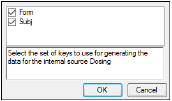
The Dosing sorts dialog uses the sort variables specified in the Main Mappings panel. By default all sort variables are selected.
-
Click OK to accept the default sort variables.
-
To select a subset of the sort variables, clear the checkbox beside the unwanted sort variable and click OK.
-
To choose new sort variables, click Rebuild in the Dosing panel. The Dosing panel is cleared and the Dosing sorts dialog is displayed again.
