Transfer ownership of root folder
Only a user with an Administrator role or the current owner can change the owner of a root folder. Once the change is completed, the previous owner will lose Security Admin permission for that folder.
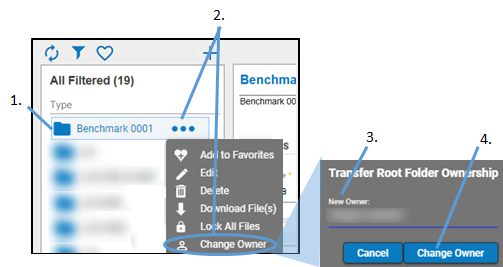
Select an existing root folder in the browser.
Click  and select Change Owner from the pop-up menu.
In dialog, select the name of the new owner from the list of available users.
Only users with Security Admin permission are listed.
Click Change Owner.
Once the owner is changed, refresh the effective permissions by changing and resetting a permission (e.g., turn a permission on and then off again).
Note: Currently, the current owner cannot be changed for legacy folders.